Creating an animated photo slideshow is a fantastic way to showcase your memories. While you can use a traditional video editor, doing so takes serious skills and hours of your time. SlideFlow, a dedicated slideshow maker for Mac, makes the process quick and easy, saving you hours of work with zero editing experience required.
The Power of Animated Photo Slideshows
Watching static photos one-by-one can quickly become tedious. Adding subtle animations transforms the viewing experience. By animating the photos themselves and blending them with smooth transitions, your scenes come to life.
Especially for photos with people, a static shot immediately turns into an engaging narrative when you start with a wide view of the environment, then gently zoom into people’s faces. Or start tight and zoom out to reveal the scenery.
SlideFlow vs. Traditional Video Editors
You can certainly build any slideshow imaginable in heavy-duty editors like DaVinci Resolve, Final Cut Pro, Adobe Premiere, or CapCut. However, this requires mastering project management, timeline syncing, and keyframe animations. Even for experienced editors, manually setting the timing and movement for every single photo is incredibly time-consuming.
SlideFlow automates the heavy lifting. Just import your media, and your animated slideshow is ready. Despite this simplicity, SlideFlow still offers extensive flexibility. When you want more control, you can easily adjust the timing, music, transitions, and animations, whether for the entire slideshow or for individual photos and videos.
Make Animated Photo Slideshows on Mac with SlideFlow
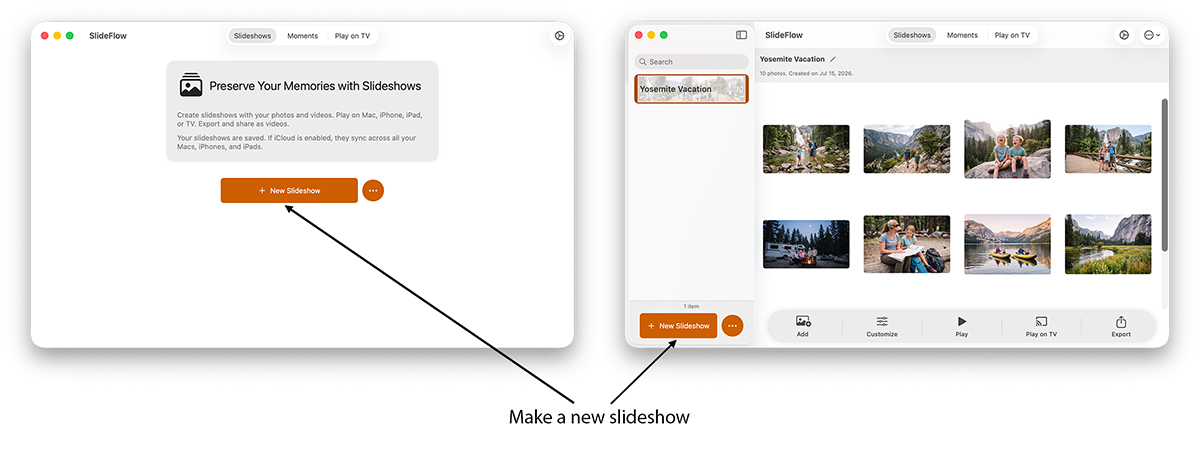
1. Make a new slideshow
On the Slideshows tab, click the New Slideshow button.
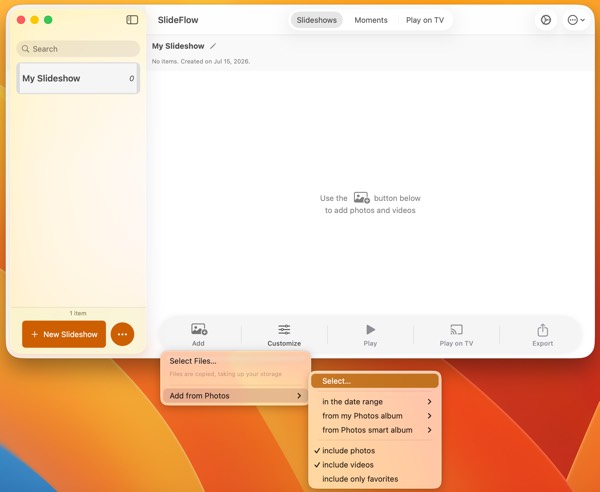
2. Add your photos and videos
Import your photos and videos directly from your Apple Photos Library or your local files. Either works, and you can mix them—though the two sources behave differently once the slideshow exists, which is what Photos library vs. files is about.
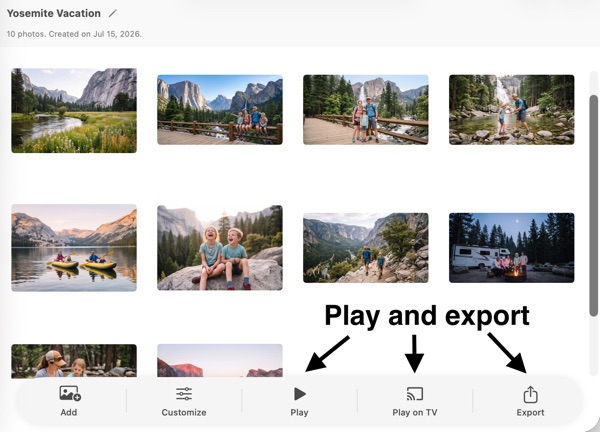
3. Play or export your slideshow
Your slideshow is ready! You can play it immediately on your Mac, cast it to a compatible DLNA TV, or export it as a standard video file that plays on any reasonably modern device. You can even choose the exact export aspect ratio (horizontal, vertical, or square) to perfectly fit any social media platform.
When playing on a Mac or TV, SlideFlow generates your slideshow on the fly, meaning the show starts almost immediately—no frustratingly long wait times like you get with other slideshow makers!
Casting needs nothing more than a DLNA TV on the same network as your Mac: connecting SlideFlow to your TV covers the setup, and what to check if your television doesn’t turn up in the list. You don’t need a slideshow to use the TV either— SlideFlow can cast single photos and videos on the big screen while you browse your library on the Mac.
4. Optional: customize your slideshow
SlideFlow’s intelligent default settings and built-in music are designed to produce beautiful, varied slideshows right out of the box. You’ll love how simple it is to drop in your photos and get a unique, engaging result every time.
As you get more comfortable, you can take full control. Add your own music, adjust pacing and animations, or customize individual clips. Music files you add go into a shared My Music library that syncs over iCloud, so a track added once is ready for every slideshow, on all your devices. Our guide on customizing slideshow settings walks through every setting, and there are dedicated guides for music, transitions, and creative filters.
Making a slideshow by hand isn’t the only way, either: SlideFlow can build slideshows for you—from a date range of your Photos library, from an album, or even from folders and files.
Final slideshow video
Here is the slideshow video created by SlideFlow for this tutorial:
(Note: SlideFlow is a universal app! Take it everywhere with you on iPhone and iPad— the slideshow you just made syncs to them over iCloud. More questions are answered in the SlideFlow FAQ).